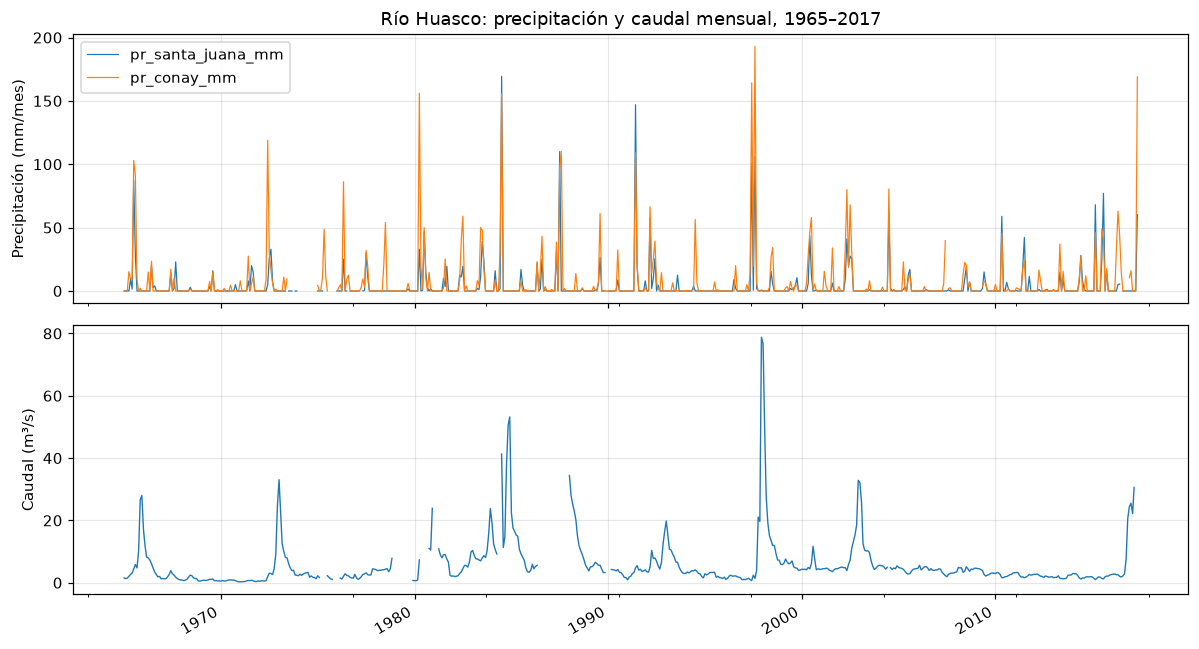
Basin hydrology
Rainfall and streamflow of the Huasco river (DGA, 1965–2017): annual regime, hydrological year and anomalies.
Python · pandas · matplotlib
Run Python, R and geospatial analysis without installing software or managing servers. Keep your projects and work from any computer.
See how it works7-day free trial, limited slots. Paid plans subject to stock.
import pandas as pd df = pd.read_parquet("sales.parquet")df.groupby("region").revenue.sum().plot.bar()Python · pandas · matplotlib
Illustration. To run real code, open the demo. Open the demo →
Persistent data
Come back to your project where you left it: your disk survives pauses and restarts.
Automated processes
Schedule notebooks and scripts by cron and get the result by email.
GIS ready to use
GDAL, GeoPandas and rasterio installed. Nothing to compile.
Managed infrastructure
Reserved resources and daily backups. We run the cluster.
From an idea to your environment
An account, a plan with available stock, and the environment your project needs.
Register with email and password. Then choose an available plan from Plan, in your panel.
JupyterLab or VS Code, with Python (SciPy stack), R, geospatial (GeoPandas, rasterio, GDAL) or PyTorch preinstalled.
Your workspace opens in the browser. Upload data or clone a repo — and it is all still there tomorrow.
Pause when you finish and resume later with your files. Pausing does not cancel a monthly subscription; wallet accounts stop consuming credit while paused.
Examples
Three real notebooks that ship with every new workspace. Two also run in your browser, no account needed.
Rainfall and streamflow of the Huasco river (DGA, 1965–2017): annual regime, hydrological year and anomalies.
Python · pandas · matplotlib
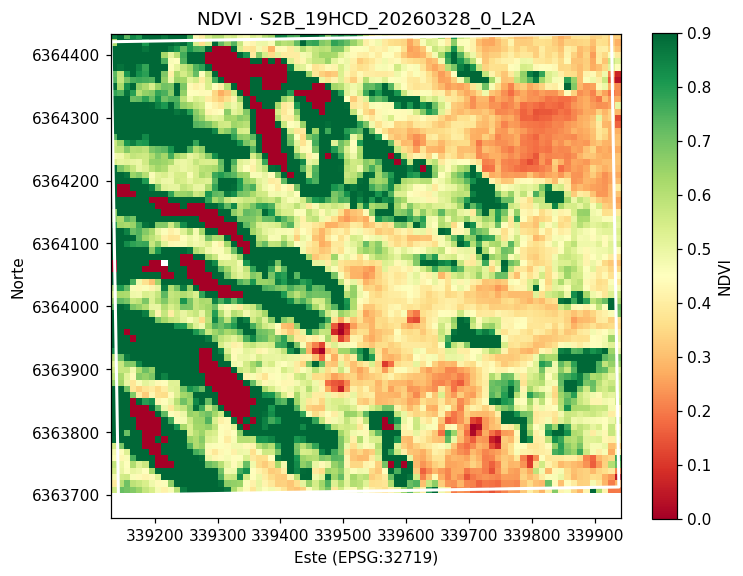
STAC search and windowed reads of the COGs on AWS: NDVI map and seasonal series.
GeoPandas · rasterio · STAC
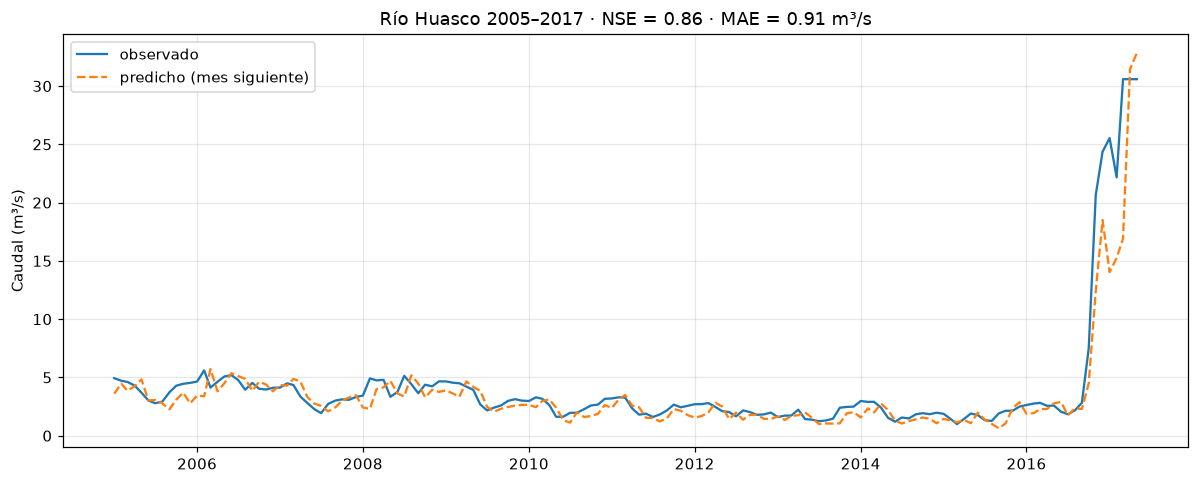
A CPU-trained MLP predicts next month's flow; honest evaluation on 2005–2017.
PyTorch · CPU
All three ship in the examples/ folder of every new workspace, with their data. Example 01 also includes a Streamlit panel (app.py) ready to publish.
You are in control
Create, pause, resume and delete workspaces. We run the cluster; you keep your focus on the data.
Example dashboard. Your account shows your actual resources and status.
We're not trying to be every cloud notebook. These are the two jobs we do better than a generic platform.
Consultancies and public agencies that work with rasters, vectors and time series, and lose days rebuilding the same environment on every machine.
Teach without spending the first two sessions fixing laptop installs. Every student gets an identical environment in the browser.
Where NotebookHub helps — and where it doesn't.
| What matters | NotebookHub | Free cloud notebooks | Local install |
|---|---|---|---|
| Your files after closing | Kept on a persistent disk | Wiped with the session | Kept — on one machine only |
| Environment setup | Preinstalled, ready to run | pip install on every session | Hours, and it drifts |
| CPU and RAM | Reserved for you (Guaranteed QoS) | Shared and variable | Whatever your laptop has |
| VS Code in the browser | Included, same workspace | Not available | Local only |
| Private data | Isolated container per user | Third-party terms apply | Private, but hard to share |
Honest caveat: for free GPU training, Colab still wins — we don't sell GPU workspaces yet. Read the full comparison →
Clear resources. Your choice.
Choose by resources. Availability is confirmed before payment.
7-day free trial: one workspace, automatic pause after 2 h of continuous running, limited slots. No credit card.
For exploring and prototyping
charged as $15,000 CLP
For serious projects
charged as $39,000 CLP
Managed service for small teams
from CLP $99,000/month depending on resources
Every plan includes CPU and RAM reserved for your size and persistent storage. Plan changes are subject to available capacity.
Prices are shown in US dollars at a reference rate; the subscription is charged monthly in Chilean pesos, which is the amount next to each price and the one Stripe shows at checkout. Pausing a workspace does not cancel the subscription. Aquedra wallet usage, where applicable, is billed per started minute; starting or resuming a workspace reserves one hour from the balance. See Billing & refunds.
Seven days with one trial-sized workspace, no credit card. It pauses itself after 2 h of continuous running and you resume it whenever you want. There is a cap on trials open at the same time: if it is full, you can still register and come back in a few days, or purchase a plan. At expiry the workspace stops and your data is preserved; if you never come back, we archive it 60 days after expiry (we email you first) and the copy stays restorable from your panel for 180 days.
Every workspace is an isolated, unprivileged container with its own disk. No other user can reach your files, and we don't train anything on your data.
Yes. It's standard Jupyter and standard files: download your notebooks and data, or push to git from the built-in terminal, whenever you want.
The Jupyter Docker Stacks images: Python with the SciPy stack (numpy, pandas, matplotlib, scikit-learn), R with tidyverse, a geospatial image and PyTorch. pip and conda work normally. What lives in work/ persists: a venv, anything installed with pip install --user and the kernels you register; conda installs go back to the original image on restart.
Direct accounts purchase monthly CLP subscriptions through Stripe, renewing until canceled from Plan, in your panel. Pausing or deleting a workspace does not cancel the subscription. Aquedra wallet usage is separate and billed per started minute of running time: starting or resuming a workspace reserves one hour from your balance, the next hour is reserved while it keeps running, and the unused minutes are refunded when it pauses. These charges are not added to a monthly subscription. The free trial requires no card and has no automatic charge.
Real humans in English and Spanish. Write to [email protected] and a person answers — no first-line bot.
Yes. Create autostart.sh at the root of your workspace (work/ in Jupyter, project/ in VS Code) and it runs with bash in the background every time the container starts: when you activate it after a pause, after a restart or maintenance. Its output goes to autostart.log. If your training is resumable, it picks up on its own without opening the panel.
Yes. On the workspace page, under Scheduled jobs, pick the notebook or script, a cron schedule and your time zone. Each run executes in a separate container over your same disk (even while the workspace is paused), leaves the executed notebook and its HTML in runs/NAME/ and emails you if it fails, or always if you prefer. Available on paid plans.
Real infrastructure, not a demo.
Each notebook has its own CPU and RAM limits and reservations in Kubernetes. Resources are checked before creation.
Your disk lives on a persistent volume. Pause without losing data, and a daily job backs the volume up to object storage.
Unprivileged pods, no root, no Docker inside. Every resource is labeled and ownership-checked.
Written by the people who actually run the cluster. Ask about a stuck kernel or a custom image and you get a real answer.
Reserved resources
Your plan's CPU and RAM are accounted for as reservations. We distinguish allocated capacity from instantaneous usage.
Persistent disk + daily backup
Your volume survives pauses and restarts, and is backed up daily to object storage.
Our own infrastructure
Runs on our Kubernetes cluster in Europe (Hetzner) — not resold on top of someone else's notebook service.
Operated by Aquedra SpA
A real company behind it, with human support in English and Spanish.
Create your account and choose a plan with available stock to get started.
Plans subject to stock · cancel anytime · your data is kept